26/08/2012

TP-LINK driversအခက္ခဲျဖစ္ေနပါသလား?

windwosအားလံုးအသံုးျပဳနိုင္ပါတယ္ဗ်ာ....
နက္စ္ခ်ိတ္ဖို႕driverအခက္ခဲျဖစ္သူမ်ားအမ်ိဳးစားလိုက္သာယူေပေတာ့


TP-LINK TF-3239DL drivers
Download link:Download Now
Adapters & 56K Modem -> Internal Data/Fax Modem
Download link:Driver Download
Download link:2Driver download
TP-LINK TF-3239DL drivers
Download link:Driver2
Download link:Driver1
TP-LINK TF-3200 drivers
Download link:Driver1
Download link:Driver2
TP-LINK TG-3468 drivers download
Download link:Driver1
Download link:Driver2
TP-LINK TL-SC3171 drivers download
Download  link:TL-SC3171 1.6.17(driver)
Download  link:TL-SC3171_1.16.18(Driver)
Download  link:Intelligent IP Installer(tool)
Download  link:undled Surveillance Software(software)
ကဲဒီေန႕ဒီေလာက္ပဲေနာက္မွဒီပို႕စ္ကိုထပ္ျဖည့္မယ္
ေက်နပ္က်လိမ့္မယ္လို႔ေမွ်ာ္လင့္ပါတယ္


25/08/2012

NOkia phoneကို ျမန္မာေဖာင့္ထည့္မယ္

Nokia C3 အတြက္ ျမန္မာ font ဘယ္လုိသြင္းရမလဲဆုိတာ ေျပာျပပါ့မယ္။
ပထမဆုံးအေနနဲ႕ ဖုန္းထဲမွာ X-plore လုိ႕ေခၚတဲ့ file Manager ေဆာ့၀ဲေလးရွိရပါမယ္။
မရွိရင္ေအာက္မွာ ရယူနုိင္ပါတယ္။
X-plore(for window mobile) အားရယူရန္
X-plore ကုိဖုန္းမွာ install လုပ္ပါ။ ျပီးရင္ X-plore ထဲကုိ၀င္ပါ ။ configuration menu ကုိသြားျပီး show hidden files and system folders ကို
အမွန္ျခစ္ေပးပါ။ ျပီးရင္ ကုိယ့္ဖုန္းရဲ႕ internal memory z:/resource/fonts folder ေအာက္မွာ font အမ်ိဳးအစားတစ္ခုကုိ file သုံးခုနဲ႕ေတြ႕ပါလိမ့္မယ္။
ဥပမာေျပာရင္ S60SC.ccc, S60TCHK.ccc and S60ZDIGI.ttf ဆုိျပီးေတာ့ ေတြ႕ရင္ အဲဒီနာမည္ သုံးမ်ိဳး ကုိခဏမွတ္ထားပါ။
ျပီးရင္ မိမိသြင္းခ်င္တဲ့ ျမန္မာ font ရဲ႕ name ကုိ ခုနက ဖုိင္သုံးဖုိင္ရဲ႕ နာမည္ေတြကုိ rename ေပးလုိက္ပါ။ ဥပမာ- zawgyi.ttf ကုိ zawgyi ဆုိတာကုိတင္ဖ်က္ျပီး ေနာက္က file အမ်ိဳးအစားကုိမေျပာင္းဘဲ S60SC.ccc, S60TCHK.ccc and S60ZDIGI.ttf ဆုိျပီး ေပးခုိင္းတာပါ။
ျပီးရင္ ဖုန္းရဲ႕ memory card ကုိ ကြန္ပ်ဴတာနဲ႕ခ်ိတ္ပါ။ memory card ရဲ႕ directory ေအာက္ resource ဆုိတဲ့ folder ထဲကို၀င္ပါ(ဥပမာ-e:/resource) ။ ျပီးရင္ resource folder ထဲမွာ “Fonts” ဆိုတဲ့ နာမည္နဲ႕ folder တစ္ခုတည္ေဆာက္ပါ။ ျပီးရင္ ခုနက system font ေတြရဲ႕
နာမည္ေတြအတုိင္း rename ေပးထားတဲ့ ျမန္မာေဖာင့္ဖုိင္သုံးခုကုိ အသစ္ေဆာက္ထားတဲ့ Fonts ဖုိဒါေအာက္ကုိ ပုိ႕လုိက္ပါ။
ဥပမာအားျဖင့္ e:/resource/fonts/S60SC.ccc, S60TCHK.ccc and S60ZDIGI.ttf) ။ ျပီးရင္ ဖုန္းကုိ restart ခ်လုိက္ပါ။
ျပန္တက္လာရင္ ျမန္မာလုိ ျမင္ရျပီျဖစ္ပါတယ္။
မွတ္ခ်က္။ဒီပို႕စ္ကိုေတာ့က်ေနာ္မစမ္းရေသးသျဖင့္ေသခ်ာမသိေသးသည့္အတြက္ပံုနွင့္တကြမရွင္းျပေသးပါ
ေနာက္မွပံုနွင့္တကြရွင္းျပမည္
အဆင္ေျပေစလိုေသာဆႏၵ(ေက်ာ္ေက်ာ္မိုး)
ပ်က္စီးမူ႕အတြက္
ဆက္သြယ္ရန္လိပ္စာ။Email:kyawkyawmoe594"gmail.com
ဆက္သြယ္ရန္လိပ္စာ။phone:60108605040

phoneအတြက္root softwareမ်ားလိုေနသလား၊

ဖုန္းအတြက္အမ်ီဳးစားလိုက္ခြဲေပးထားတယ္ဗ်ာ..
လိုအပ္သည့္ျဖစိ္္ပါကေအာက္တြင္ေဒါင္းယူနိုင္ပါသည္
phone to  Root Explorer software
Download link:re2142.apk(xperia x8)


Xperia X8ကိုဘယ္လိုrootလုပ္မလဲ။
  1. ကဲစျပီး Settings-> Applications -> Development > Turn the USB 
  2. အေပၚကအဆင့္ေတြပီူရင္ဒီွအဆင့္Settings-> SD Card, USB Mass Storage & Phone Storage > ကို on ေပးပါ


ေအာက္မွာroot Xperia X8 2.1 အတြက္သံုးရမယ့္နည္း

  အရင္ဆံုး "SuperOneClick".
ကိုေဒါင္းေလာ့ဆြဲခ်ပါ
. ပီးရင္ phone နဲ႕ "PC" ခ်ိတ္ဆက္ေပးပါ
ရန္ "Charge Phone".
. ကဲဖြင့္မယ္ "SuperOneClick" ကိုကလစ္လိုက္ရင္ေအာက္ကပံုအတိုင္းေပၚေနမယ္ "Root".ကိုနိပ္ပါ
5. ခဏေစာင့္လိုက္ပါအလုပ္လုပ္ေနပါလိမ့္မယ္

6. အေပၚကပံုအတိုင္းမတ္ေဆ့ေလးျပန္လာရင္okနိပ္ေပးလိုက္ပါဗ်ာ..
ဒီလိုဆိုရင္သူငယ္ခ်င္ူးရဲ႕ဖုန္းကို
rootလုပ္တာေအာင္ျမင္စြာျပီးဆံုးူပါပီ

ကဲXperia X8ကို
rootလုပ္တာအဆင္ေျပပီဆိုေတာ့ေက်နပ္ေရာေပ့ါဗ်ာ..အဆင္မေျပဘူးဆံုးရံုးမူ႕ရွိခဲ့ရင္ျပန္ဆက္သြယ္ပါဆံုးရံုးတန္းဖိုူးေပးေဆာင္မည္။
ဆက္သြယ္ရန္လိပ္စာ။Email:kyawkyawmoe594"gmail.com
ဆက္သြယ္ရန္လိပ္စာ။phone:60108605040
Download link:super-one- click


Fonts Change ရန္လိုအပ္မည့္software

Fonts Change ရန္ အတြက္ ေဖာင့္လွလွေလးေတြ
အဆင္ေျပတာနဲ႕ေဒါင္းပါ
အားလံုးတူတူပါပဲဗ်ာ..
phone:software(free)
Download link:Root%29.apk
Download link:Root.apk?
Download link:ZawgyiRoot.apk
Download  link:mediafire

iTunes 10 တြင္ Zawgyi Font ရေအာင္ လုပ္ျခင္း

iTunes 10 တြင္ Zawgyi Font သံုူးလို႕ရပါပီ

အရင္ဆံုး Resource Folder ထဲက en.lproj ေအာက္ကTextStyles.plist ဆိုတာကို ရွာၿပီး Notepad လိုမ်ိဳး Plain Text Editor နဲ႔ဖြင့္ပါ။

ကၽႊန္ေတာ္ကေတာ့  Notepad ++ နဲ႔ပဲ ျပပါမယ္။

ဖြင့္လိုက္ရင္ ပံုထဲက အတိုင္း xml နဲ႔ေရးထားတဲ့ Text File ေပၚလာပါမယ္။
ပံုထဲမွာ Segoe UI (Windows 7 Default Font) ႏွင့္ Tahoma ဆိုတဲ့ Fonts ႏွစ္ခုရယ္ ပံုထဲမွာ မျမင္ရတဲ့ Lucida Grande ဆိုတဲ့ Font ရယ္ေတြ႕ရပါမယ္။

ၿပီးရင္ အခုနကေျပာတဲ့ Fonts သံုးခုလံုးကို Zawgyi-One နဲ႔ လဲပါမယ္။ Replace ကို Ctrl + H ႏွိပ္ၿပီး ေခၚလို႔ရသလို ပံုမွာလည္းျပထားပါတယ္။

Find What တြင္ Segoe UI, Tahoma နဲ႔ Lucida Grande တို႔ကို ရိုက္ထည့္ၿပီး Replace With မွာ Zawgyi-One သို႔ မိမိသံုးမဲ့ Font Name ကို ရိုက္ထည့္ႏိုင္ပါတယ္။ ၿပီးရင္ Replace All ကိုႏွိပ္ၿပီး Save လုပ္ေပးလိုက္ပါ။

အားလံဳး လုုပ္ျပီးသြားျပီ ဆိုရင္ေတာ့ ေအာက္ကအတိုင္း ျမင္ရမွာ ျဖစ္ပါတယ္။

တစ္ခုေကာင္းတာက zawgyi မသံုးခ်င္ရင္ lang ခ်ိန္းလိုက္တာနဲ႔ အဆင္ေျပသြားပါလိမ့္မယ္။
အဆင္မေျပသူမ်ားဆက္သြယ္နိုင္သည္
ဆက္သြယ္ရန္လိပ္စာ။Email:kyawkyawmowe594"gmail.com
ဆက္သြယ္ရန္လိပ္စာ။phone:60108605040

Myanmar Font for Nokia

Download link:FontRouterMan
Download link:FontRouter.LT.Build2007
အဲဒီႏွစ္ခုကို ေဒါင္းျပီး ဖံုးထဲက internal memory မွာ install လုပ္လိုက္ပါ..
filemanager ကိုသံုးျပီး C:/data/Fonts ထဲကို ေဇာ္ဂ်ီေဖာင့္(.ttf ျဖစ္ရပါမယ္ .TTF မျဖစ္ရပါဘူး)ထည့္လိုက္ပါ..
ျပီးရင္ ခုနက install လုပ္ထားတဲ့ FontRouterMan ကိုဖြင့္ပါ
option ကေနျပီး c ေအာက္ ကိုယ္ထည့္ထားတဲ့ ေဖာင့္ဖိုင္ကိုေရြး ျပီးရင္ ထြက္လိုက္ပါ..
www.symbian-guru.com/wp-content/uploads/2009/08/how_to_change_choos..." height="240" width="320" />
ဖုံးကို reboot ျပန္လုပ္လိုက္ပါ
ျမင္ကြင္းကိုေတာ့ အထဲမွာပါတဲ့ အတိုင္း လိုက္ညွိၾကည့္လိုက္ေပါ့…ေသခ်ာတာက တခါလုပ္ျပီးတိုင္း တစ္ခါ reboot လုပ္ရမွာပါ..ျမင္ကြင္းကိုေတာ့ အထဲမွာပါတဲ့ အတိုင္း လိုက္ညွိၾကည့္လိုက္ေပါ့…ေသခ်ာတာက တခါလုပ္ျပီးတိုင္း တစ္ခါ reboot လုပ္ရမွာပါ..
nokia 5800 နဲ႔ N95 မွာေသခ်ာေပါက္ရပါတယ္ စမ္းၾကည့္ၾကပါ

အဆင္မေျပလွ်င္ေမးလ္ျဖည့္ေသာ္လည္းေကာင္း..ဖုန္းျဖစ္ေသာ္လည္းေကာင္း
ေမးျမန္းနိုင္ပါတယ္ဗ်ာ...
ဆက္သြယ္ရန္လိပ္စာ။Email:kyawkyawmoe594"gmail.com
ဆက္သြယ္ရန္လိပ္စာ။phone:60108605040

SamsungကိုRootလုပ္ျပီးzawgyi-oneထည့္သံုးမယ္

. Galaxy ACE ကို Root လုပ္ဖို႔အတြက္ Rooting Package ကို Download link:Upd-1.zip (download)
2. Phone ကို Computer နဲ႔ခ်ိတ္ၿပီး Download လုပ္ထားတဲ့ upd_1.zip ကို SD ကဒ္ထဲကူးထည့္ပါ။
3.Copy ကူးၿပီးရင္ေတာ့ ဖုန္းကို ပိတ္လိုက္ပါ။ Recovery mode ကိုသြားဖို႔ Volume Up + Menu + Power တို႔ကိုဖိထားပါ။
4.Recovery Mode ထဲကိုေရာက္သြားၿပီဆိုရင္ေတာ့ Install zip from SD Card ကိုေရြးလိုက္ပါ။ ၿပီးရင္ေတာ့ Choose Zip from SD ကိုေရြးလိုက္ပါ။
5. ၿပီးရင္ေတာ့ upd_1.zip ကိုေရြးၿပီး Power button ကိုႏွိပ္လိုက္ပါ။ Root လုပ္တာ ၅ မိနစ္ကေန ၁၀မိနစ္အတြင္းၾကာႏိုင္ပါတယ္။
6. Root လုပ္လို႔ၿပီးရင္ေတာ့ ++++ Go Back ++++ ကိုေရြးပါ။ ၿပီးရင္ေတာ့ Reboot System Now ကိုႏွိပ္လိုက္ပါ။
အခုဆိုရင္ Samsumg Galaxy ACE ကို Root လုပ္လို႔ၿပီးသြားပါၿပီ။    
            ZawGyi font Install လုပ္အုန္းမယ္ဗ်ာ

1. DroidSansFallback.ttf ကိုDownload link:DroidSansFallback.ttf

2. Root Explorer ကိုဖြင့္ၿပီးေတာ့ DroidSansFallback.ttf ရွိတဲ့ ေနရာကိုသြားၿပီး DroidSansFallback.ttf ေပၚမွာ ဖိထားလိုက္ပါ။


3. ေပၚလာတဲ့ Pop-up Menu ထဲက Copy ကိုေရြးပါ။


4. /Systems/Fonts ေအာက္ကိုသြားပါ။ DroidSansFallback.ttf ေပၚမွာ ဖိထားလိုက္ပါ။ အဲ့လို ဖိမထားခင္မွာ စစ္ေဆးရမွာက System type က r/w ျဖစ္ေနရမွာျဖစ္ပါတယ္။ 


5. ေပၚလာတဲ့ Pop-up Menu ထဲက Permission ကိုေရြးပါ။

6. Permission ထဲမွာ အားလံုးကို အမွန္ျခစ္ေရြးၿပီး Ok ကိုႏွိပ္ပါ။


7.  ၿပီးရင္ ေတာ့ Paste ကိုႏွိပ္လုိက္ပါ။


8. Overwrite လုပ္မလားလို႔ ေမးလာရင္ Yes ကိုႏွိပ္လုိက္ပါ။


အခုဆိုရင္ Android မွာ ZawGyi font ကို Install လုပ္လို႔ၿပီးသြားပါၿပီ။
ခုနည္းလမ္းေလးကအဆင္ေျပဆံုးပါပဲဗ်ာ....တစ္ကယ္လို႔လူၾကီးမင္းရဲ႕ဖုန္း

တစ္ခုခုခ်ိဳယြင္းသြားခဲ့ရင္ၾကိဳက္သလိုကြန္မန္႕ေပးနိုင္ပါတယ္

ဆံုးရံုးသြားပါကေရာ္ေၾကးေပးေဆာင္မည္

မွတ္ခ်က္(ဒီနည္းလမ္းတိုင္းမလြဲေခ်ာ္သြာလုပ္ေပးပါရန္အဓိကအေရးပါသည္)

ဆံုးရံုးသြားပါကဆက္သြယ္ရန္လိပ္စာ(Email:kyawkyawmoe594"gmail.com
                                           (Phone:60108605040
                    

24/08/2012

Huawei C8650 ႏွင့္ C8800 ဖုန္းမ်ားအတြင္းသို႔ Myanmar Font ႏွင့္ Keyboard ထည့္သြင္းပံု


ျပည္တြင္းတြင္ CDMA 800 MHz ဖုန္းမ်ား အသံုးျပဳမႈမ်ားလာသည္ႏွင့္ အမွ် 800 MHz ဟန္းဆက္မ်ားတြင္ လူသံုးမ်ားေသာ ဟန္းဆက္မ်ားမွာ C8650 ႏွင့္ C8800 ဖုန္းမ်ားျဖစ္ေနတာကို ေတြ႔ရွိရပါတယ္။ ယင္းဖုန္းႏွစ္မ်ိဳးကုိ ျမန္မာစာ Fonts ထည့္သြင္းရန္ အရင္ဆံုး Root ျပဳလုပ္ရန္ လိုအပ္ပါတယ္။ ထိုကဲ့သို႔ Root ျပဳလုပ္ပံုအေသးစိတ္ကုိေတာ့သိေလာက္ပီထင္ပါတယ္ဗ်ာ..
ယခု Huawei C8650 ကုိ Myanmar Font ထည့္သြင္းျခင္းကုိ စတင္ေဖၚျပေပးမွာျဖစ္ပါတယ္။ Font ထည့္သြင္းရန္ လိုအင္ေသာ Software မ်ားမွာ Root_Explorer , DroidSansFallback.ttf, MyanDroid-Soft-Keyboard စသည္တို႔လိုအပ္ပါတယ္။ ယင္း Software မ်ားအားလံုးကို ေအာက္မွာတင္ေပးထားပါတယ္။
Software မ်ားအားလံုးရရွိၿပီဆိုရင္ ဖုန္းကုိ ကြန္ပ်ဴတာႏွင့္ ခ်ိတ္ဆက္ၿပီး SD ကဒ္အတြင္းသို႔ထည့္၍ Root_Explorer ႏွင့္ MyanDroid-Soft-Keyboard တို႔ကုိ ဖုန္းတြင္ Install ျပဳလုပ္ေပးရပါမည္။ Install ျပဳလုပ္ၿပီးပါက Root_Explorer အတြင္းရွိ System အတြင္းသို႔ဝင္၍ app အတြင္းသို႔ ထပ္မံဝင္ေရာက္ရပါမည္။ Install ျပဳလုပ္ၿပီးပါက Root_Explorer အတြင္းရွိ System အတြင္းသို႔ဝင္၍ app အတြင္းသို႔ဝင္ေရာက္ၿပီးပါက Screen ထိပ္နားရွိ Mount R/W ကုိတစ္ခ်က္ႏွိပ္၍ Mount R/O ကုိေျပာင္းေပးၿပီး SogouInput.apk ဖိုင္ကုိ Delete ျပဳလုပ္ေပးရမည္ျဖစ္သည္။
ထုိကဲ့သို႔ Delete ျပဳလုပ္ရာတြင္ အျခားေသာ ဖိုင္မ်ားကို မွားယြင္းဖ်က္မိျခင္းမရွိေစရန္ သတိျပဳရပါမည္။
ၿပီးေနာက္ Root_Explorer အတြင္းရွိ sdcard အတြင္းသို႔ဝင္၍ DroidSansFallback.ttf ကုိ Copy ကူး၍ အျပင္ဘက္ရွိ System အတြင္းရွိ fonts ထဲသို႔ဝင္၍ Screen အေပၚရွိ Mount R/W ကိုတစ္ခ်က္ႏိွပ္၍ Mount R/O သို႔ေျပာင္းေပးၿပီး Paste ျပဳလုပ္ေပးရမည္ျဖစ္သည္။ ထိုသို႔ျပဳလုပ္ၿပီးပါက ယင္း Paste လုပ္လိုက္ေသာ Fonts ကိုဖိႏွိပ္ထားၿပီး Options ေပၚလာပါက Permissions ကို ႏွိပ္၍ ပံုပါအတိုင္းအမွန္ျခစ္မ်ားေပးရမည္ျဖစ္သည္။


Root_Explorer အတြင္းရွိ sdcard အတြင္းသို႔ဝင္၍ DroidSansFallback.ttf ကုိ Copy ကူးပါ။
Copy ကူးလာေသာ DroidSansFallback.ttf ကုိ မွ်ားျပထားေသာ Font ဖိုင္အတြင္းသို႔ Paste ျပဳလုပ္ပါ။
Paste လုပ္ၿပီးေသာ DroidSansFallback.ttf ကုိ Option အတြင္းရွိ Permissions ကုိႏွိပ္၍ ပံုပါအတိုင္း အမွန္ျခစ္ေပးပါ။
ၿပီးေနာက္ဖုန္း Setting အတြင္းရွိ Language & Keyboard အတြင္းသို႔ဝင္၍ MyanDroid Soft Keyboard ကုိအမွန္ျခစ္ေပးၿပီး စတင္အသံုးျပဳ၍ရၿပီျဖစ္သည္။ အထက္ပါအဆင့္မ်ားအားလံုး ျပဳလုပ္ၿပီးပါက Huawei C8650 အတြင္းသို႔ ျမန္မာစာ Font ႏွင့္ Keyboard ထည့္သြင္းျခင္းၿပီးဆံုးၿပီျဖစ္သည္။
Huawei C8800 အတြင္းသို႔ Myanmar Font ႏွင့္ Keyboard ထည့္သြင္းပံုမွာ C8650 ထည့္သြင္းသည့္ ပံုစံအတိုင္း ျပဳလုပ္ရမည္ျဖစ္ေသာ္လည္း C8800 တြင္မႈ Sogoulnput.apk ဖိုင္ကုိ Delete ျပဳလုပ္ေပးရန္မလိုအပ္ေပ။ က်န္အဆင့္မ်ားမွာ C8650 ျပဳလုပ္သည့္ ပံုစံအတိုင္ပင္ျဖစ္သည္။
မွတ္ခ်က္။        ။ အထက္ပါ Myanmar Font ထည့္သြင္းျခင္းမွာ မွားယြင္းမႈတစ္စံုတစ္ရာရွိခဲ့ပါက ဖုန္းပ်က္တတ္ေသာေၾကာင့္ တစ္ဆင့္ျခင္းကို ေသခ်ာစြာ ျပဳလုပ္ရန္လိုအပ္ပါသည္။ မွားယြင္းျပဳလုပ္မႈေၾကာင့္ ျဖစ္ေပၚလာေသာအနဲငယ္ဆံုးရံုူးသြားပါကတာ၀န္ယူမည္မဟုတ္ပါ
သို႔ေသာ္ခုေပးတဲ့ေမာ္ဒယ္နံပတ္နဲ႕ဆိုင္ရာဆိုင္ရာကိုေရြးရန္လိုအပ္သလိုက်ေနာ္ေျပာထားသလိုလဲေနရာေလးေတြလြဲေနတတ္ပါတယ္..

အဆင္ေျပမယ္လို႔႕ပဲေမွ်ာ္လင့္ေနမယ္ေနာ္...အခက္ခဲျဖစ္ေနပါက(ျပန္လည္ဆက္သြယ္ပါ(email:kyawkyawmoe594"gmail.com)


Download link:Root.zip
Download link:z-4-root1.apk
Download link:fontchanger.zip
Download link:Keyboard%20(1.1.91).apk
Download link:netqinanti_2iv1668o.apk

Rootလုပ္မယ္

Root ဆိုတာဘာလဲ???
Linux OS မွာေတာ့ Root ကို Administrator အျဖစ္ သတ္မွတ္ပါတယ္။ Windows Platform မွာေတာ့ Admin Level တစ္ေယာက္အေနျဖင့္ Full Permission ကို အျပည့္အဝရပါတယ္။ Linux Platform မွာေတာ့ Root Level တစ္ေယာက္အေနျဖင့္ Full Permission အျပည့္အဝရသည့္အျပင္ Open Source ျဖစ္သည့္အတြက္ System အပိုင္းထိပါ ကိုင္တြယ္ႏိုင္ပါတယ္။

Android OS မွာ ဘာလို႕ Root လုပ္ၾကတာလဲ???
အထက္မွာ ရွင္းျပခဲ့သည့္ Root Level အေၾကာင္းကို အထိုက္အေလ်ာက္နားလည္မည္ဆိုပါက ဘာေၾကာင့္ Root လုပ္တယ္ဆိုတာကို ဆက္စပ္ေတြးၾကည့္လို႕ရပါတယ္။ အလြယ္ေျပာရရင္ ဖုန္းမွာ ပါဝင္ၿပီးသား System and Application ေတြအျပင္ ပိုသုံးခ်င္သူ၊ ပိုကလိခ်င္သူေတြက Root လုပ္ၾကပါတယ္။ ( ကြ်န္ေတာ္ အပါအဝင္ေပါ့...။ ) အဲလို ကလိႏိုင္ဖို႕အတြက္ Android ဖုန္းကို Root လုပ္ၾကပါတယ္။ iphone မွာေတာ့ ဒါကို Jail break လုပ္တယ္လို႕ ေခၚပါတယ္။
စာဖတ္သူက Andorid ဖုန္း အသုံးျပဳသူဆိုရင္ေတာ့ ေအာက္ပါ အဆင့္ေတြအတိုင္း လြယ္ကူစြာ Root လုပ္ႏိုင္ပါတယ္။

Root လုပ္ဖို႕အတြက္ Root Application တစ္ခုလိုပါတယ္။ သို႕ေသာ္ မိမိကိုင္ေဆာင္ေသာ ဖုန္း၏ Brand and Model ကို လိုက္ၿပီး Root လုပ္ႏိုင္တဲ့ Application ေတြကို ေသခ်ာေရြးခ်ယ္ဖို႕လိုပါတယ္။ ယခု စာေရးသူေဖာ္ျပေပးမည့္ Z4root တြင္လည္း သူနဲ႕ Compatible ျဖစ္သည့္ ဖုန္းအမ်ိဳးအစားမ်ားကို ေဖာ္ျပေပးထားပါတယ္။ မိမိ၏ ဖုန္းအမ်ိဳးအစား အတိအက် ပါဝင္မွသာလ်င္ Root လုပ္ပါရန္ ၾကိဳတင္ သတိေပးအပ္ပါသည္။


Z4root
Compatible with Permanent Root Option

Samsung Galaxy S (All variants)
Backflip
Sony X10
Xperia Mini
Droid 2
Galaxy Tab
Galaxy I5700
Galaxy 3 I5800
Droid X
Samsung Acclaim
Cricket Huawei Ascend
Motorola Cliq
Huawei 8120
Huawei C8500
Huawei C8600
Hero
G1
Optimus T
Droid 1
Garmin Asus A50
Motorola Defy
LG Ally
Motorola Flipside
Motorola Milestone 2
Dell streak
X10 Mini Pro
Smartq v7 android 2.1

( Reference by xda-developers.com )

အထက္ေဖာ္ျပပါ ဖုန္းအမ်ိဳးအစားတြင္ ပါဝင္မွသာလ်င္ Z4root.apk ကို Download လုပ္ယူပါ။

Download: Z4root 1.3.0.apk

1. Z4root.apk ကို မိမိဖုန္း၏ SDcard တြင္ ထည့္သြင္းပါ။

2. မိမိ Android ဖုန္း၏ Menu တြင္ File Manager ကို ရွာပါ။ ဝင္ပါ။ SDcard ကိုသြားပါ။ အဲမွာ ခုနက ကူးထည့္ထားတဲ့ Z4root.apk မွာ တစ္ခ်က္ႏွိပ္ပါ။ Install လုပ္ပါ။ Install လုပ္ၿပီးေနာက္ Application အား တန္းသုံးလိုပါက Open လုပ္ႏိုင္သလို Done မွာ ႏွိပ္ပါက Application ထည့္သြင္းမွဳ ၿပီးဆုံးသြားပါမည္။

3. Z4root Application ကို အသုံးျပဳၾကည့္ပါမယ္။ Menu ထဲတြင္Z4root ကို ရွာပါ။ ဝင္ပါ။ ပုံႏွင့္တကြ ေဖာ္ျပေပးလိုက္ပါတယ္။ ေလ့လာၾကည့္ပါ။


4. ဒီအဆင့္မွာ Root လုပ္ဖို႕အတြက္ ေရြးခ်ယ္စရာ ႏွစ္ခုရွိပါမယ္။ Temporary Root နဲ႕ Permanent Root ပါ။

Temporary Root ကိုေရြးခ်ယ္ပါက Root ကို ယာယီ လုပ္ေပးတာပါ။ ဖုန္းကို ပိတ္မိၿပီး ျပန္ဖြင့္ပါက UnRoot ျဖစ္သြားပါတယ္။

ဒါေၾကာင့္ အျမဲတန္း Root အျဖစ္ထားလိုပါက Permanent Root ကို ေရြးခ်ယ္ရပါမည္။ Permanent Root ကို ​ေရြးခ်ယ္ၿပီးပါက Rooting လုပ္ေနပါမည္။ ၿပီးပါက ဖုန္းကို Restart ခ်သြားပါမည္။ Android OS ျပန္လည္တက္ၿပီးပါက Menu ထဲတြင္ SuperUser ဆိုသည့္ Application Icon တစ္ခုေပၚေနၿပီ ဆိုပါက Android OS ကို Root လုပ္တာ ေအာင္ျမင္ပါၿပီ။


Root လုပ္ၿပီးၿပီဆိုေတာ့ ၾကိဳက္ရာ Android Application ေတြ၊ ျမန္မာေဖာင့္ေတြ၊ ျမန္မာလက္ကြက္ေတြႏွင့္ တျခားကလိစရာေတြ အမ်ားၾကီးထည့္သြင္း အသုံးျပဳႏိုင္ပါၿပီ။ ဒါေပမဲ့ ကိုယ္ဖုန္းက Root လုပ္ၿပီးသုံးေနတာဆိုတာကိုလဲ မေမ့ပါနဲ႕ေလ...။ Root လုပ္ထားေတာ့ ကိုယ္ဘာလုပ္လုပ္အတားအစီးမရွိ ကလိလို႕ရေနမွာပါ။ တခ်ိဳ႕ System အပိုင္းေတြကို ထိခိုက္သြားမယ္ဆိုရင္ေတာ့ စာေရးသူျဖင့္ မည္သို႕မွ
ကြ်န္ေတာ္တစ္ခုေျပာခ်င္တာကေတာ့အစဦးလုပ္ဖူးကိုင္ဖူးတာဆိုရင္ေသခ်ာဂရုစိုက္လုပ္ေစခ်င္တယ္ဗ်ာအခကိမသင့္ရင္compuiter
windowမတက္တဲ့ထိျဖစ္နိုင္သြားပါတယ္.....ဗ်ာ....အဆင္ေျပမယ္လို႕ေမွ်ာ္လင့္ပါတယ္..ေနာက္လဲဆက္တင္သြားမည္(mobileနဲ႔ပတ္သက္တာသိတာအကုန္တင္ေပးသြားမည္..
.

15/08/2012

USB Thifတဲ့၊ဗ်ာ

USB  Thifတဲ့ဗ်ာဘယ္ေနရာမွာသံုးလဲဆိုရင္ခိုးတဲ့ေနရာမွာသံုးပါတယ္...အဟက္
ဘာေတြခိုးလဲဆိုရင္ေတာ့passwordကအစခိုးပါတယ္ဒီေကာင္ေလးကိုusbထဲကိုအစေတာ့လုပ္လိုက္ယံုပါပဲ
ပီးရင္မိမိခိုးခ်င္တဲ့ကြန္ျပဴတာမွာသြားထိုးလိုက္ပါသူသံုးေနဆတာေတြအားလံုးပါလာပါလိ္မ့္မယ္
အဆင္ေျပပါေစဗ်ာ.....မရွင္းခဲ့ဘူးမရဘူးဆိုရင္အေၾကာင္းျပန္ေပးပါ
(kyawkyawmoe594@gmail.com)
Download  Link:USB Thif(Download Now

11/08/2012

windows password resetလုပ္မယ္

     windows  password  reset  software
Download  Link:Download Now
  • Download လုပ္ထားတဲ့ထဲက ISO fileကို
  •  ISO ေလးကိုCD/DVDျဖစ္Burnပ
    Burnပီးရင္Typeထဲကိုေခြထည့္ပီးbootတက္လိုက္ပါ
    အေသးစိတ္ကိုေနာက္မွေအးေဆးျပန္ေရးေပးပ့ါမယ္

အလုပ္လုပ္ေသာwindows

  • Windows XP
  • Windows Vista
  • Windows 7

Systemအတြက္ CD

  • CD-ROM drive

Administrator Password in Windows?

Administrator Password  ကိုresetလုပ္မယ္
လုပ္နည္းေအာက္မွာ(အဂၤလိပ္လို)
his method includes the first thing which should do whenever you forget your Windows login password. When we install Windows, it automatically creates an account "Administrator" and sets its password to blank. So if you forget your user account password then try this:
Start your computer and when you see Windows Welcome screen / Login screen, press ++ keys twice and it'll show Classic Login box.
Windows_Classic_Logon_Box.png
Now type "Administrator" (without quotes) in Username and leave Password field blank. Now press Enter and you should be able to log in Windows.
Now you can reset your  acc  password from "Control Panel -> User Accounts".
Same thing can be done using Safe Mode. In Safe Mode Windows will show this in-built Administrator account in Login screen.
2nd Method:
If the above mentioned trick doesn't work, try following trick which is actually a loophole in Windows XP Setup and also a big security hole:
A. Boot using Windows XP Setup CD and follow the instruction like Accepting EULA, etc.
B. When it asks to repair your existing Windows installation, accept it and press "R" to run the repair.
C. Setup will start repairing your Windows and will start copying files, etc.
D. After a few minutes setup will restart your system and when it restarts don't press any key when it shows "Press any key to continue..." otherwise Setup will start from the beginning. Don't press any key and setup will resume where it left.
E. Now it'll start doing other tasks and will show a small progressbar with a few details in left side.
F. Look carefully at the details and when it shows "Installing devices", press +F10 keys in your keyboard.
G. It'll open a Command Prompt window. Now type nusrmgr.cpl and press .
Remove_Change_Administrator_Password_Using_Windows_XP_Setup.png
H. It'll open the same "User Accounts" window which you see in Control Panel.
I. Now you can remove or reset any account password without any problem.
3rd Method:
Windows XP and later Windows versions provide a built-in method to recover forgotten password by using "Password Reset Disk". If you created a Password Reset Disk in past, you can use that disk to reset the password.
If you don't know how to create a password reset disk, lets tell you in details. You can create the password reset disk using Control panel -> User Accounts applet.
First open Control Panel and click on User Accounts icon. It'll open User Accounts window. Now click on your user account and then click on "Prevent a forgotten password" link given in left-side pane. It'll open forgotten password wizard as shown in following screenshot:
Create_Windows_Password_Reset_Disk.png
Follow the instructions and you'll have a password reset disk in your hand.
4th Method:
You can also use various bootable rescue CDs to reset your Windows password as mentioned in following link:

There are also a few 3rd party utilities available to help you recover your Windows password such as:
  • UBCD for Windows
  • Ultimate Boot CD (UBCD)
  • Offline NT Password & Registry Editor
You can search for their download links on Google, Bing or any other favorite s

Speed Up Windows XP – Master Tutorial to Make Windows XP Super Fast

Speed Up Windows XPစမယ္ေနာ္
2. Right-click ကိုDesktopေပၚမွာေထာက္ပါProperties, ကိုနိပ္ပါေရာက္ရင္Appearance ကိုနိပ္ပါ Effects ဆိုတာထပ္နိပ္ပါEffectsေဘာက္ေလးက်လာပါပီေအာက္ကပံုနဲ႕စာအတိုင္းပါလုပ္သြားေပးပါရန္ပီးရင္ေတာ့
 okကိုနိပ္ပါ
အိ
  • Use the following transition effect for menus & tooltips.
  • Show shadows under menus.
3. Right-click ကို My Computerကိုေထာက္ပါProperties မွ Advanced tabကိုသြားပါ Settings 3ခုေတြ႕ပါလိမ့္မယ္ Performance ကိုနိပ္ပါ
ပီးရင္ေအာက္ကပံုနဲ႕စာအတိုင္းမွန္ျခစ္ပါ

  • Show window contents while dragging.
  • Smooth edges of screen fonts.
  • Use common tasks in folders (If you use the left side pane in My computer)
  • Use drop shadows on icon labels on the desktop. (to make the desktop icons label transparent.)
  • Use visual styles on windows and buttons. (If you use XP themes.)အေပၚကစာတိုင္းလုပ္ပီးပါကApply(or)okသို႕နိပ္ပါ
4. folderမွTools -> Folder Options. ကိုနိပ္ပါ View tab:ကိုနိပ္ပါ
ကဲအေေပၚကပံုအတိုင္းလုပ္ေပးသြားပါ
  • Automatically search for network folders & printers.
  • Display file size information in folder tips.
  • Display simple folder view in Explorer's Folders list.
  • Show encrypted or compressed NTFS files in color.
  • Show pop-up description for folder and desktop icons.
  • Use simple file sharingပီးရင္ေတာ့့okေပ့ါ
    ကဲဒီေလာက္ဆိုသူငယ္ခ်င္းရဲ႕computer(or)laptopအေတာ္အသင့္ေပ့ါသြားမွာပါပဲဗ်ာအဆင္ေျပပါေစ
    မရွင္းရင္(kyawkyawmoe594@gmail.com)ကိုအကူညီေတာင္းနိုင္ပါသည္

Create Bootable USB Drive to Install Windows Vista, Server 2008 and 7


 ေခါင္းစဥ္ၾကည့္ယံုနဲ႕သိ္ေရာေပ့ါဗ်ာ
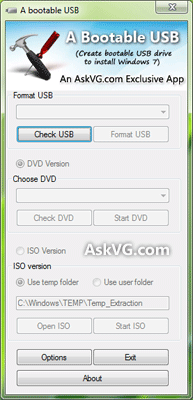
Once you meet the requirements, run the utility. Its a portable utility so doesn't need installation. Simply run it and check the option "I have read and accepted the following License Agreement". Now click on OK button and it'll launch the main application.
A_Bootable_USB
It also shows a Help window so that you can use the utility easily. The utility requires only 4 easy steps to follow:
  • Check USB drive (To check whether your USB drive is attached or not)
  • Format USB drive
  • Choose DVD or ISO image (To copy the required files to USB drive)
  • Start the process to create bootable USB drive
Download  Link:Bootable_USB_kk

Keep your private files in a password protected folder

During the installation of My Lockbox, you will be asked to provide the location of the protected folder. On completion of the installation, your folder will become hidden and locked.
My Lockbox Control Panel

Features and benefits

  • Extremely easy in use.
  • Hotkey to open Control Panel with a simple keystroke.
  • Effective password protection.
  • FAT, FAT32, NTFS volumes are supported.
  • Supports all modern Windows operating systems (XP, Vista, 7) including 64-bit editions.
  • Almost any folder on your computer can be password protected.
  • Prevents you from locking system-critical folders, e.g. C:\Windows.
  • Instant protection - no file scrambling or moving to another place.
  • Trusted processes feature lets backup, antivirus or similar software to backup or scan your protected folder.
  • Protects folders even in Windows safe mode.
  • Skinned user interface.
  • Freeware *
အသံုး့ျပဳနည္းကိုျမန္မာလိုတင္ေပးပ့ါမယ္ဗ်ာ...ေလာေလာဆယ္ေတာ့
အဆင္မေျပတဲ့ညီအကိုေမာင္ႏွမမ်ား(kyawkyawmoe594@gmail.com)
Download  Link:Download Now
Download  link:Upgrade to My Lockbox Pro Now!

google talk shell 1.2.1

gtalkshellပါဘယ္ေနရာမွာသံုးလဲဆိုရင္္GtalkမွာမိမိပံုေလးေတြAutoေျပာင္းတာပါပဲ
ဘယ္လိုအသံုးျပဳရမလဲဆိုတာေတာ့ေနာက္ေန႔မွဒီပို႕စ္ေလးနဲ႕အတူတင္ေပးပါ့မယ္
လိုအပ္တဲ့အကိုမ်ားအမမ်ားညီေလးမ်ားညီမေလးမ်ားလိုအပ္ရင္ေအာက္မွာdownloadလုပ္နိုင္ပါတယ္ဗ်ာ
အားလံုးအဆင္ေျပမယ္လိုေမွ်ာ္လင့္ပါတယ္
လိုအပ္ခဲ့ရင္kyawkyawmoe594@gmail.comကိုေမးလ္ပို႕စ္အကူညီေတာင္းနိုင္ပါတယ္ဗ်ာ
Download  Link:Download Now
Download  Link:Download Now 2


27/06/2012

Anti-Virus Free 2012 12.0.2180

AVG Anti-Virus Free 2012 12.0.2180 - x64

Download linkL:Download Now

AVG Anti-Virus Free 2012 12.0.2180
Download  link:Download Now


AVG Anti-Virus Free 2012 12.0.2180 - Online Installer
Download link:Download Now


avast! Free Antivirus 7.0.1447 RC1
Download  link:Download Now

avast! Free Antivirus 7.0.1426
Download  link:Download Now

avast! Free Antivirus 6.0.1367
Download  link:Download Now

Kaspersky Anti-Virusပါupdateထြက္လို႔႕တင္ေပးလုိက္ပါတယ္


Kaspersky Anti-Virus Complete Update - 24 June, 2012
Download  link:Download Now

Kaspersky AV Previous week's Updates - 24 June, 2012
Download link:Download Now

Kaspersky AV Current week's Update - 27 June, 2012
Download  LInk:Download Now

ကဲလာျပန္ပီAVG Anti-virus 2012ထြက္ေလးပါ

AVG Anti-Virus Free 10.0 Update June 27, 2012
Download  link:Download Now

AVG Anti-Virus 10.0 Updates June 27, 2012
Download link:Download Now
ကဲလာျပန္ပီAvast Free Antivirus7ပါဗ်ာ

Avast Free Antivirus7(71MB)
Download  link:Download Now
ကဲဆက္ပါအုန္းလာျပန္ပီUSB Antivirus 2012ေလးပါupdateေနာ္

 Trustport USB Antivirus 2012(101.78MB)
Download  link:Download Now  

NOD32 Antivirus or ESET Smart Security5(.64.Bit.)(32bit)

Download  link:Download Now
ကဲကဲဆက္အားေပးးအုန္းေနာ္ESET smart  security5 &  crack  (64bit/32bit)ESET smart  security5 &  crack  (64bit/32bit)(53.3MB)
windows(
WinXP/Vista/7/
32 bit and 64 bit)


Download  link:Download Now


ESET.Smart.Security.5.&.ESET.NOD32.AntiVirus.5.Incl.Crack(32.and.64.Bit) | 215.20MiB
Download  link:Download Now

Kaspersky   keyမရွိသူမ်ားေအာက္ကလင့္မွာေဒါင္းေလာ့ဆြဲပါကီးဖိုင္တစ္ခုတည္းပါ


Download  link:Download Now


RISING Antivirus Free Edition 2012ေနာ္..ဟဲဟဲမရွိသူမ်ားအတြက္တင္ေပးလိုက္ပါတယ္ဗ်ာ
ေအာက္ကလင့္မွာေဒါင္းေလာ့ခ်ယူက်ပါဗ်ာ
RISING Antivirus Free Edition (39.8MB)
Download  link:Download Now

လာျပန္ျပီဗ်ာအားေပးပါအုန္း

ClamWin Free Antivirus 0.97.4(42.5MB)

Download  Link:Download Now
ကဲဒီေကာင္ေလးလဲမဆိုးဘူးေျပာ၇မယ္ဗ်
Comodo Free Antivirus(2012.5.10)ရက္ကထုပ္တဲ့ေဆာ့၀ဲလ္ေလးပါ
Comodo Free Antivirus(84.7MB)
Download  Link:Download Now
အင္တာနက္စ္ကweb  siteေတြ၀င္ရင္ကူညီမယ့္ေကာင္ေလးပါ

Dr.Web CureIt! 7.0.1.5210(112MB)
Download  link:Download Now
ကဲဗိုင္းရပ္စ္သတ္တဲ့ေဆာ့၀ဲလ္ေလးေတြတင္ေပးလိုက္ပါတယ္ဗ်ာ..အားလံုးFree and  keygenေတြပါပဲအမုန္းသံုးပါ...တစ္ကယ္လို႔႕မ်ားကီးေတြေတာင္းေနခဲ့ရင္လဲျပန္ေျပာလည့္ပါ...ဗ်ာ

ဒီေကာင္ေလးေတြေတာင္းထားတာကေတာ့(ညီေလးေ၀လင္းေအာင္ျဖစ္ပါတယ္ဂ်ီေတာ့မွာလာေတာင္းထားလုိ႔တင္ေပးလုိက္တာပါ)

ကဲညီေလးေရ.............အဆင္ေျပပါေစကြာ


22/06/2012

gtalkခ်က္windowsထဲကေနyoutube videoေတြၾကည့္မယ္


gtalkခ်က္windowsထဲကေနyoutube videoေတြၾကည့္မယ္ဆိုရင္ေတာ့အရင္ဆံုးေအာက္မွာေပးထားတဲ့လင့္တစ္ခုခုကိုေဒါင္းေလာ့ခ်လိုက္ပါ
livkလင့္ကို2ေနရာေပးထားပါတယ္အဆင္ေျပတဲ့လင့္ကိုသာေဒါင္းပါ

Download  link:GTheme2.0 (7.14MB) Download Now

Download  link:gtheme2.0.(7.14MB)Download Now
မူးရင္းလင့္(ဒီဆိုက္ဒ္ကမူရင္းလင့္ပါ

downliadခ်ပီးလို႕ရလာတဲ့ဖိုင္ကိုေျဖပါအဲ့ထဲမွာGtheme2.0.exeဆိုတဲ့ဖိုင္ကိုinstallလုပ္လိုက္ပါ

ပီးရင္gtalkကိုဖြင့္ပါပီးရင္ေတာ့settingsဆိုတာေလးနိပ္လိုက္ပါဗ်ာ
settingsမွAppearanceကိုနိပ္ပါchat  ThemeထဲမွာSravi-bubble colorဆိုတာေျပာင္းေပးလုိက္ပါေျပာင္းရင္ေအာက္ကပံုလိုေလးေပၚလာပါလိမ့္မယ္ဗ်ာ
Download Gthemes
ဒီပံုစံအတိုင္းေလးေပၚလာရင္ေတာ့အိုေကသြားပါပီ
အိုေကvideoကိုဘယ္လိုျမင္ရမလဲဆိုတာျပမယ္ေနာ္အရင္ဆံုးမမျပခ်င္တဲ့သူငယ္ခ်င္းရဲ႕ခ်က္ေဘာက္ေလးကိုကလစ္ပါ
ပီးရင္စာေရးသလိုပဲရိုဒးရိုးစာရိုက္သလိုပဲရိုက္မယ္ေနာ္..ဟဲဟဲ

ကဲဒီပံုေလးထဲကလိုေရးပါပီးရင္Enterေခါက္လိုက္ဒါဆိုရင္ေတာ့ျမင္ရပါပီvideoၾကည့္လို႕ရပါပီဗ်ာ...ဟဲဟဲ
မွတ္ခ်က္။လင့္ေတြ႕ရဲ႕ေရွ႕နဲ႕ေနာက္မွာဒါေလးေတြေတာ့ပါဖို႕လိုပါတယ္sravi:utube: a href="http://www.youtube.com/watch?v=P6HYimHlj4E%3E">
မိမိျပလိုက္တဲ့videoကိုလဲတစ္ဖက္လူကဒီေဆာ့၀ဲလ္ေလးရွိေနမွသာလွ်င္မိမိျပလိုက္တဲ့videoေလးၾကည့္နိုင္မွာျဖစ္ပါတယ္
http://www.youtube.com/watch?v=P6HYimHlj4E%3Eဒီစာေၾကာင္းေနရာမွာမိမိvideoလင့္ေလးနဲ႕အစားထိုးလိုက္ပါ
အဆင္ေျပက်ပါေစဗ်ာ......


internet download manager 6 11 full

Download   linK:Download Now(win-RAR file)


Download   linK:Download Now (win-zip

Download   linK: IDM_6.11_beta_Including_C­rack_%2C_patch_%26_key.ra­r

Download   linK: Internet Download Manager­6.11 Beta Full with Patch­Crack _­gettingdreams.com.mht

အဆင္ေျပက်ပါေစဗ်ာ


Aleo Flash Intro Banner Maker 3.8 full

Aleo Flash Intro Banner Maker 3.8 Aleo Flash Intro Banner Maker 3.8 + Rus | 6.7 Mb(6.50MB) ေလးပါပံုေတြနဲ႕သီခ်င္းလုပ္ခ်င္သူမ်ားအတြက္လိုအပ္မယ္ထင္လို႕တင္ေပးလိုက္ပါတယ္
လုပ္နည္းကေတာ့အရမ္းလြယ္လို႕မရွင္းျပေတာ့ဘူးေနာ္..ဟဲဟဲေအာက္မွာေဒါင္းေလာ့လင့္ေပးထားပါတယ္ဗ်ာာအဆင္ေျပပါေစလို႕ေမွ်ာ္လင့္ပါတယ္ကီးလဲေပးထားတယ္ေနာ္

Username : soft98.ir

Serial : 682-C614-DC55-985E51-BD400-BF

     8A1-5ED2-E4CA-A23AD4-E1847-B9

     D9F-7EFD-4D47-7241BA-B8C5A-F4
Download  link:Download Now